
Watch the Video
I Was One Step Away from Hatching OpenClaw
Wednesday night. Terminal open. OpenClaw repo cloned. Environment variables set. I was literally on the openclaw hatch step — the final command that spins up the WebSocket gateway and pairs your phone — when the Claude desktop app itself popped up offering to sync with my phone.
Wait, what?
Anthropic had just shipped Dispatch for Cowork and Channels for Claude Code. Phone-to-desktop remote control. Telegram and Discord bots. Official, integrated, no self-hosting required. And the app I already had running was telling me about it.
I closed the terminal. ctrl+c. Done.
I'm three days late writing this because I spent those three days actually using Dispatch and Channels instead of writing about them. But here we are. Let me walk you through what these features are, how they compare to OpenClaw, and how to set them up — including the gotchas that cost me an embarrassing amount of time.
What Is Dispatch?
Dispatch is a new feature inside Claude's Cowork mode (the desktop app) that turns your phone into a remote control for your desktop Claude session. It launched on March 17, 2026 as a research preview.
The concept is simple: you're away from your desk, you think of something Claude should do on your machine, and you message it from your phone. Claude picks it up on your desktop and gets to work — accessing local files, running tools, browsing the web, whatever it needs.
Think of it as SSH for your AI agent, except the interface is a chat thread on your phone.
How It Works
Dispatch creates a single persistent conversation thread that syncs between the Claude mobile app and the Claude desktop app. Messages you send from your phone appear in the desktop session, and Claude's responses (including file links, screenshots, and progress updates) show up on your phone.
Your desktop needs to be awake and Claude Desktop needs to be open. This isn't a cloud-hosted agent — your machine is doing the work. That's a feature, not a limitation: your files stay local, your tools stay local, and Claude has the same access it would if you were sitting in front of it.
Setting Up Dispatch
Setup takes about two minutes:
- Update Claude Desktop to the latest version (macOS required for now — Windows support is in development)
- Update the Claude mobile app on your phone
- Open Claude Desktop, navigate to the Cowork tab
- Click Dispatch in the left panel — you'll see a QR code
- Open the Claude mobile app, scan the QR code
- That's it. You're paired.
No OAuth dance. No API keys. No config files. Scan and go.
Who Gets It
Dispatch rolled out to Max subscribers ($100/month) on day one. Pro subscribers ($20/month) are getting access within days of launch. A broader rollout to free users is planned for later in 2026.
Dispatch vs Channels vs OpenClaw at a Glance
Before diving into Channels, here's how these three options stack up:
| Feature | Dispatch | Channels | OpenClaw |
|---|---|---|---|
| Interface | Claude mobile app | Telegram, Discord | WhatsApp, Telegram, Discord, Signal |
| Platform | macOS (desktop app) | Any OS (Claude Code CLI) | Any OS (self-hosted) |
| Connection model | Outbound HTTPS | Outbound HTTPS | Inbound WebSocket |
| Open ports required | None | None | Yes |
| Setup time | ~2 minutes | ~10 minutes | ~30+ minutes |
| CVEs to date | 0 | 0 | 7 (including critical RCE) |
| Maintained by | Anthropic | Anthropic | Community |
| Permission control | Built-in | Built-in + flag options | Custom |
| Cost | Pro/Max subscription | Free (Claude Code) | Free (self-hosted) |
What Are Channels?
If Dispatch is for Cowork users who want phone-to-desktop control, Channels is the developer-facing equivalent for Claude Code. It shipped on March 20, 2026 — three days after Dispatch — as a research preview in Claude Code v2.1.80+.
Channels lets external messaging apps push events into a running Claude Code session. You send a message from Telegram or Discord, your local Claude Code session picks it up, does the work against your real files and dev environment, and replies in the same chat.
This is the feature that VentureBeat called an "OpenClaw killer" — and they're not wrong.
Supported Platforms
The research preview supports Telegram and Discord through official plugins maintained by Anthropic. The architecture is plugin-based, so more platforms can be added. During the preview, the --channels flag only accepts plugins from Anthropic's allowlist.
Setting Up Channels: Telegram
Here's the complete setup, aligned with czmilo's excellent guide on dev.to and battle-tested with my own swearing and troubleshooting. You'll need Claude Code v2.1.80+.
Step 1: Install Bun (the right way)
Do not use the curl one-liner from bun.sh (curl -fsSL https://bun.sh/install | bash). On macOS, this installs a version that the Telegram plugin silently fails to find in its PATH. I spent a solid 30 minutes wondering why my bot was giving me the silent treatment — no errors, no logs, just pure ghosting. Turns out the fix was two words: brew install. If you take away one thing from this guide, let it be this: life is too short for curl-piped shell scripts when Homebrew exists.
brew install oven-sh/bun/bunVerify it works:
bun --versionStep 2: Create a Telegram bot
Open Telegram and go to the Contacts tab — not your regular message list. This trips people up because your instinct is to search in chats, but BotFather lives in Contacts.
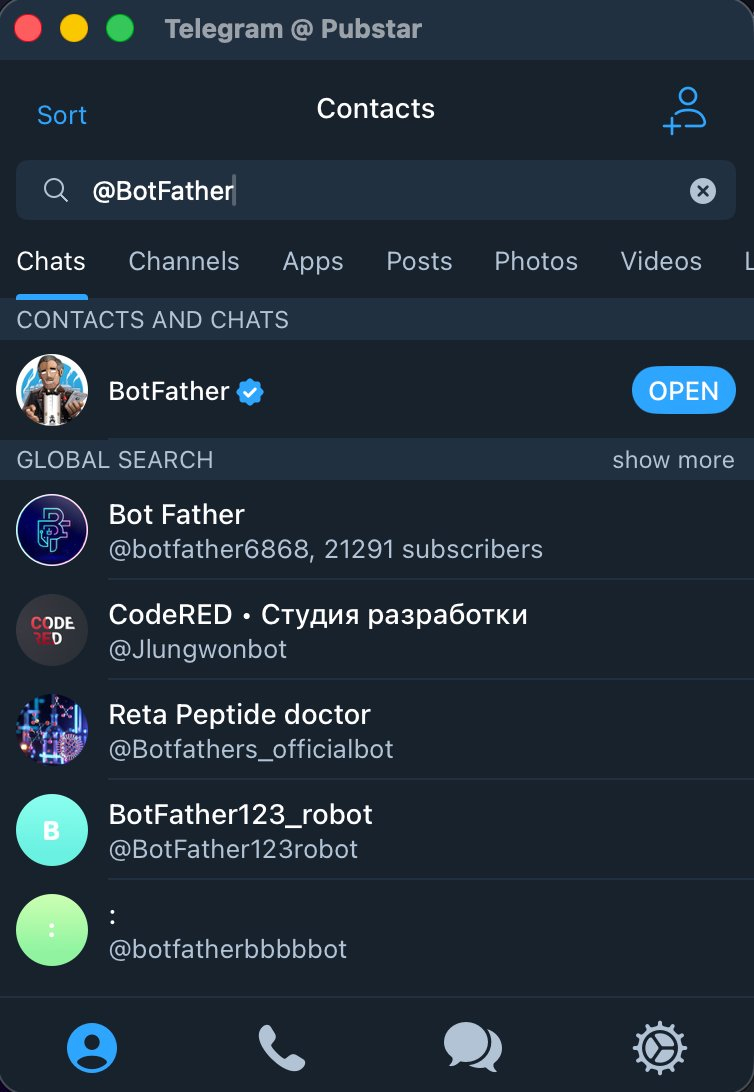
Type @BotFather in the search bar and tap the verified result with the blue checkmark. Hit Open, then tap Create a New Bot.
BotFather will ask for two things: a display name (anything you want) and a username that must end in _bot (e.g., my_claude_bot). Once created, BotFather gives you an API token — copy it and keep it safe. Anyone with this token can control your bot.
Step 3: Install the plugin
Start a Claude Code session and run:
/plugin install telegram@claude-plugins-official
/reload-pluginsIf /telegram:configure doesn't tab-complete after installing, exit and restart Claude Code. The plugin registry sometimes needs a fresh session to pick up new installs.
Step 4: Configure the token
/telegram:configure YOUR_BOT_TOKEN_HEREThis saves your token to ~/.claude/channels/telegram/.env.
Step 5: Relaunch with the channel flag
Exit your Claude Code session and relaunch with:
claude --channels plugin:telegram@claude-plugins-officialRunning from a parent project folder? If you keep a folder of projects and switch between them (like I do), you'll want to combine the channel flag with --dangerously-skip-permissions so Claude can approve file operations without you being at your desk:
claude --dangerously-skip-permissions --channels plugin:telegram@claude-plugins-officialI learned this the hard way — at the park with my kids, phone barely getting signal, Claude sitting at home waiting for permission approval I couldn't give. Without the flag, you're tethered to your terminal for every permission prompt.
Only use --dangerously-skip-permissions in environments you trust or have isolated. The flag name is intentional — it skips all safety prompts. Never use it on a machine with sensitive credentials you wouldn't want Claude touching.
Step 6: Pair your account
Before trying to pair, open your bot's chat in Telegram and tap Start (or type /start). This initializes the bot conversation. Skip this step and you'll be staring at a silent bot wondering what you did wrong — the pairing flow won't trigger until the conversation is initialized. This one cost me more time than I'd like to admit.
DM your bot on Telegram. It replies with a 6-character pairing code. Back in your Claude Code session, enter:
/telegram:access pair ABCDEFYour next message to the bot goes straight to Claude.
Step 7: Lock it down
Once paired, switch to allowlist mode so random people can't get pairing codes from your bot:
/telegram:access policy allowlistSetting Up Channels: Discord
1. Create a Discord application:
Go to the Discord Developer Portal, click New Application, and name it. In the Bot section, create a username, click Reset Token, and copy the token. Under Privileged Gateway Intents, enable Message Content Intent. In OAuth2 > URL Generator, select the bot scope and the permissions Claude needs.
2. Install and configure:
/plugin install discord@claude-plugins-official
/discord:configure YOUR_BOT_TOKEN
3. Pair and go:
DM your bot on Discord. It replies with a pairing code. Done.
Testing Without External Services
If you want to kick the tires without setting up Telegram or Discord, Anthropic ships a fakechat demo channel that runs a chat UI on localhost. No auth, no external services — just a browser tab and your Claude Code session.
How This Compares to OpenClaw
OpenClaw is a free, open-source autonomous AI agent that operates through messaging apps — WhatsApp, Telegram, Discord, Signal, iMessage. It's been the go-to solution for developers who wanted to message their AI agent from their phone.
So why did I cancel my install?
Security Is the Dealbreaker
OpenClaw requires an inbound WebSocket gateway exposed to the internet. Your machine listens for incoming connections. In under three months, OpenClaw has racked up seven CVEs, including CVE-2026-25253 — a critical RCE vulnerability with an 8.8 CVSS score that let attackers fully compromise a victim's machine with a single malicious webpage. Over 40,000 OpenClaw instances were found exposed on the internet, with 63% assessed as vulnerable.
Other highlights from the CVE list include privilege escalation bugs that let unpaired devices self-assign admin scopes, sandbox bypass vulnerabilities, and shell injection through environment variables. It's been a rough few months.
Dispatch and Channels use outbound-only HTTPS connections. No open ports. No WebSocket gateway sitting on your network. Your machine connects out to Anthropic's infrastructure — nothing connects in.
Official vs. Third-Party
OpenClaw is a community project, maintained by volunteers. That's admirable, but it also means security patches depend on maintainer availability, and the project's creator recently joined OpenAI, which raises questions about the project's future direction.
Dispatch and Channels are maintained by Anthropic — the company that makes Claude. They have every incentive to keep these features secure and reliable because their brand depends on it.
Setup Complexity
OpenClaw requires cloning a repo, configuring environment variables, setting up a WebSocket gateway, managing SSL certificates for the inbound connection, and running the hatch command. It's not terrible, but it's a lot of moving parts.
Dispatch: scan a QR code. Channels: install a plugin and paste a bot token. Done.
The Security Model
Both Dispatch and Channels inherit Claude's existing permission system. When Claude wants to do something risky — running a shell command, modifying a file, accessing the network — it pauses and asks for permission. That permission prompt shows up on whatever device you're using: your phone for Dispatch, your Telegram/Discord chat for Channels.
This is the right default. You want a human in the loop for destructive operations.
For trusted environments (containers, VMs, CI pipelines), Claude Code supports the --dangerously-skip-permissions flag, which auto-approves all permission requests. The name is intentional — the community consensus is clear: never run this on your host machine. Containers and VMs only. The flag exists for automation workflows where you've already isolated the environment.
What This Means for the Ecosystem
Anthropic is doing what good platform companies do: they're absorbing the best ideas from the community and shipping official, integrated, secure versions. OpenClaw proved the demand for remote AI agent control. Dispatch and Channels deliver on that demand without the security baggage.
This pattern isn't new. Docker absorbed docker-compose. VS Code absorbed countless extensions into core features. The difference here is speed — OpenClaw has been around for maybe four months, and Anthropic already has an official answer.
For developers, this is good news. The features you want are becoming first-party. You don't need to maintain a self-hosted stack to message your AI from your phone anymore. And for the OpenClaw contributors who pioneered this space — respect. You proved the concept. The ecosystem is better for it.
The Catch
A few things to keep in mind:
Desktop must be awake. Both Dispatch and Channels require your machine to be on and the app to be running. There's no cloud fallback. If you close your laptop and walk away, Claude can't work.
Mac only for Dispatch. Cowork (and therefore Dispatch) is currently macOS only. Windows support is in development but there's no firm date.
Research preview limitations. Channels only accepts plugins from Anthropic's allowlist during the preview. Custom channel plugins aren't supported yet.
Single thread. Dispatch uses one persistent conversation thread. No branching, no multiple threads. This is fine for now but will need to evolve.
FAQ
Can I use Channels from my phone when I'm away from my desk?
Yes — that's the whole point. Send a Telegram message from your phone, and Claude works on your desktop back home. Just make sure your machine is awake and Claude Code is running. If you're using it from a parent project folder, add --dangerously-skip-permissions so you don't get blocked by permission prompts you can't reach.
Do I need both Dispatch and Channels?
They serve different users. Dispatch is for Claude Desktop (Cowork) users — scan a QR code and go. Channels is for Claude Code (CLI) users who want Telegram or Discord integration. If you use both Claude Desktop and Claude Code, you could technically set up both, but most people will pick the one that matches their workflow.
My bot isn't responding — what do I check?
Start with the basics: Did you install Bun via Homebrew (not curl)? Did you tap Start or send /start in your bot's Telegram chat before trying to pair? Did you relaunch Claude Code with the --channels flag? These three gotchas account for 90% of "silent bot" issues. If you're still stuck, check ~/.claude/channels/telegram/.env to make sure your token is saved correctly.
Try It
If you're on a Claude Pro or Max plan, Dispatch is ready to go — just update your apps and scan the QR code. If you don't have a Cowork account yet, you can sign up here. (Disclosure: that's a referral link — I get a small usage credit if you use it.)
If you're a Claude Code user, update to v2.1.80+ and set up a Telegram or Discord channel. The official docs walk you through every step, and czmilo's guide on dev.to is an excellent deep dive with additional context on access control and MCP tools.
And if you were mid-install on OpenClaw like I was? Close the terminal. You don't need it anymore.